


StreetEasy - Apartments in NYC
3.21.45K Reviews
App Specs
- Version
- 3.121.0
- Updated On
- License
- Free
- Downloads
- 1,000,000+
- Developer
- StreetEasy, Inc.
- Categories
- House & Home
- Platform
- Android, iOS
Screenshots
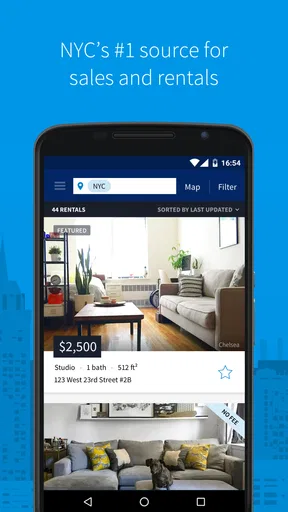
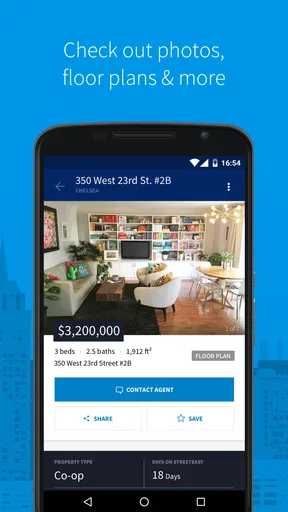
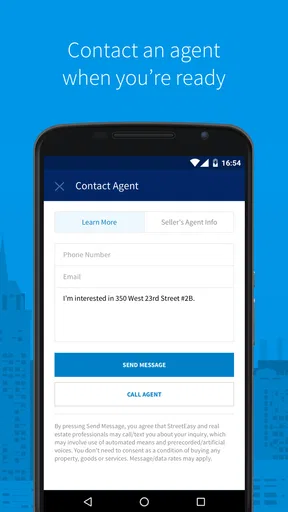
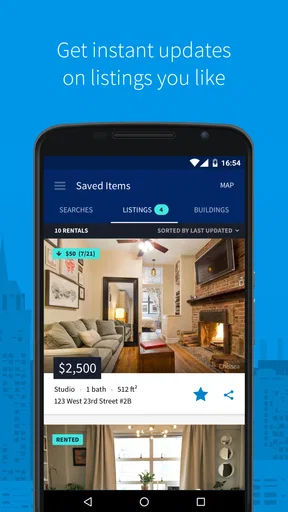
 Analysis by AppCompare
When I start looking for a New York City apartment, the first challenge is not finding a listing; it is turning a long, messy wish list into a search I can actually use. I might care about the rent, the commute, a particular area, and whether a building fits daily life, all at once. StreetEasy - Apartments in NYC gives that search a city-specific home, and I find it most useful as a way to narrow possibilities and plan what to investigate next—not as a substitute for checking a property in person.
Decide what you need before you browse
Before opening the app, I would separate firm requirements from preferences. A maximum budget or a necessary commute is a hard boundary; a preferred finish or extra amenity may be negotiable. That distinction matters in New York, where a broad search can produce too many tempting options, while an overly strict one can hide places worth considering. I start with the few filters that genuinely determine whether a home could work, then loosen them only if the results are too narrow.
StreetEasy is a free House & Home app from StreetEasy, Inc., focused on New York City rentals and homes for sale. It has an average rating of 3.2 from around 5,200 ratings, and more than a million installs. Those figures suggest a widely used tool that also draws mixed reactions, so I would treat it as a practical starting point and judge each listing on its own merits. It is rated for Everyone, and version 3.109.0 requires Android 8.0 or later.
Build a search that matches real life
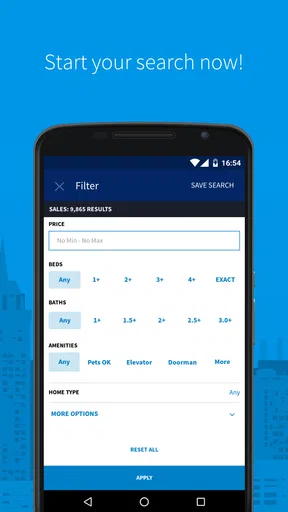
Once I know my non-negotiables, I use the neighborhood and price options to make a manageable first pass. The detailed filters described in the app can help distinguish between apartments that look similar in a quick scroll—for example, a place that allows pets or has a washer and dryer in the unit. I would avoid selecting every desirable amenity at once. In a city with varied buildings and rules, a filter is helpful only if I am prepared to treat it as a genuine requirement.
A useful workflow is to run one search for the ideal apartment and another with one preference relaxed. If the second search reveals a promising area or a different kind of building, I can compare the trade-off rather than dismissing it out of hand. I also keep a short note of why each candidate made the cut: acceptable commute, workable layout, or a feature I would otherwise pay extra effort to find. That small habit makes a growing set of listings easier to evaluate later.
From shortlist to a real-world decision
After I have a search that feels realistic, the app’s job shifts from discovery to helping me decide what deserves follow-up. This is where I slow down. A polished photo or a persuasive description can make a place feel settled before I have checked the practical details, so I use the listing as a prompt for questions, not as proof that the apartment will suit me.
Read a listing as a first look, not a promise
Floor plans, photos, descriptions, and video tours where available can give me a useful preview before I spend time travelling across the city. I look for what each item answers and what it leaves open. A floor plan can help me think through furniture and movement; photos can show visible finishes; a video can offer a better sense of the rooms. None of these replaces seeing the actual apartment, checking its condition, or confirming that the details still apply.
Worth Reading Before You Choose

Flipboard Shows What News Apps Must Do Beyond the Feed

Switching to Android Auto Means Rethinking Your Driving Routine

Google Calendar Makes a Crowded Week Easier to Manage

Ludo King Makes the Most of the Minutes Between Plans

Baby Panda World Brings Quick Play to Modern Phones, but Its Game Library Feels Busy

ESPN’s Live Game View Makes Following Close Games Easier
For a realistic weekday search, I might check new matches on the way to work, save a few that meet my essential needs, and revisit them in the evening with a clearer head. Rather than immediately arranging visits for every attractive result, I compare the practical points first: location, layout, listed features, and whether the description raises questions. Then I contact the relevant listing party through the available process and confirm what matters before making plans. That handoff—from browsing to a person who can answer property-specific questions—is a point where I would be deliberate rather than assume the app has resolved everything.
Use the neighborhood view to test the choice
Neighborhood information can help me compare areas when I am new to the city or considering a move across boroughs. Local schools, nearby public transport, and noise information are useful prompts for thinking beyond the apartment’s walls. I would still test the commute at the time I actually travel and visit the block if I can; the character of a street and the feel of a journey are personal, and summary information cannot make that decision for me.
A non-obvious way to use this material is to compare the same routine across two possible homes. I can ask how each one affects the trip to work, errands, or visits with friends, rather than judging neighborhoods by reputation alone. If I am deciding between a larger apartment farther away and a smaller one closer to my regular destinations, that comparison turns a vague preference into a more concrete trade-off. The app can help me gather the starting points, but my own schedule determines which option is better.
Alerts help with timing, but not with rushing
Saved search alerts are useful when I have a defined set of criteria and do not want to repeat the same search constantly. I would set them after removing filters that are merely nice to have, so a potentially suitable listing is less likely to slip past because I made the search too restrictive. At the same time, an alert is a reason to review a match promptly, not a reason to make a decision without checking it.
In a competitive search, speed matters most at the screening stage: I can quickly decide whether a new result is worth investigating, then follow up with clear questions. I would not let a notification replace checking availability, costs, building details, or the viewing arrangements directly. The useful outcome is a faster, more organized shortlist—not certainty that an apartment is still available or that every detail is as I understood it.
Compare tools and choose the right handoff
The mortgage and commute calculators add a planning layer that is easy to overlook when I am focused on photos. A buyer can use a mortgage estimate as an initial budgeting prompt, while a renter may get more value from thinking through commute time and location. I treat calculations as rough decision aids rather than a complete picture of affordability or travel: my actual expenses, route, schedule, and circumstances matter more than a convenient on-screen estimate.
Compared with general property search apps or browsing scattered listings through other channels, StreetEasy’s strongest reason to open it is its New York City focus. A broad marketplace may be preferable if I am searching outside the city or want to compare several regions in one place. For an NYC search, I would use StreetEasy to build and monitor a local shortlist, then rely on direct conversations, visits, and my own checks for the final decision. It is a useful handoff tool, not a replacement for the people and real-world steps involved.
Know where the process can break
The main limitation is that a detailed listing can create a sense of certainty that the real-world process has not earned yet. Availability and property details need to be confirmed, and reviews about buildings or landlords are best treated as signals to investigate rather than a definitive verdict. One person’s experience may not match mine, but a specific concern can still give me a thoughtful question to raise during a visit or conversation.
There is also a practical trade-off in how much I trust filters. A precise search saves time, but it may exclude a home because information was entered differently or because a feature is described in another way. When the results feel unexpectedly thin, I would broaden one criterion at a time and inspect listings manually instead of assuming the city has nothing suitable. That approach keeps the search focused without letting the filter settings make the decision for me.
This is a good fit for renters and buyers who are actively comparing New York City options, especially people who value local search detail and want a single place to organize early discovery. It is less suitable for someone searching well beyond NYC, or for anyone who expects an app to verify a listing, negotiate terms, or replace an in-person inspection. If I only want a casual look at apartments, it can still be interesting, but alerts and careful comparisons matter most when I have a real move in mind.
What I would do before committing
Before I act on a promising result, I would confirm the listing is current, clarify any detail that affects my budget or daily routine, and arrange an appropriate viewing. I would also compare the building and location with my own priorities instead of relying on a single review or a neighborhood summary. These steps answer the questions the app cannot settle for me: whether the home is still an option, whether the conditions fit, and whether I can see myself living there.
StreetEasy has been available since September 29, 2014, and its current version is 3.109.0. For me, the useful takeaway is not that one app can make a difficult housing search effortless. It is that a focused NYC tool can make the first stages more orderly: define needs, find candidates, compare the areas, and know what to ask next. With a 3.2 average, I would go in with realistic expectations, but its free access makes it easy to see whether its city-specific approach suits my search.
Getting Started with StreetEasy
First things first, downloading the StreetEasy app was a breeze. Available on both Android and iOS, it’s free to download, which is always a nice perk. Once installed, you’re greeted with a clean and intuitive interface that gets right to the point—finding you a home.
Easy Navigation and User-Friendly Interface
The layout is super straightforward, which I absolutely love. No unnecessary clutter, just the essentials. You can search by neighborhood, price, amenities, and more. The filters are super detailed; you can even specify if you need a pet-friendly building or a washer/dryer in the unit. This level of customization is a lifesaver, especially in a city where every building seems to have its own set of rules and quirks.
In-Depth Listings
One of the standout features of the app is the depth of information available on each listing. We’re talking floor plans, high-quality photos, and even video tours in some cases. It’s like having a mini open house in your pocket. Each listing also includes detailed descriptions, which I found really helpful for understanding the vibe of a place before even stepping foot in it.
Neighborhood Insights
Another feature that caught my eye was the neighborhood insights. This is perfect for someone like me who’s always wanted to live in NYC but isn’t quite sure which neighborhood suits my lifestyle. The app offers comprehensive details about local schools, nearby public transport, and even noise levels. It’s like having a local guide right at your fingertips.
Stay Updated with Alerts
If you’re serious about your apartment search, the alert feature is your new best friend. You can set up alerts for new listings that match your criteria, ensuring you’re always in the loop. Trust me, in a competitive market like NYC, being the first to know about a new listing can make all the difference.
Additional Tools and Features
StreetEasy also offers some handy tools like a mortgage calculator and a commute calculator. These are super useful for understanding the financial and lifestyle implications of your potential new home. It’s little touches like these that make the app feel comprehensive and well thought out.
Community and Reviews
One thing I didn’t expect but really appreciated was the community aspect. Users often leave reviews about buildings and landlords, giving you a heads up about potential issues. It’s like having a friend share insider tips, which is invaluable when making such a significant decision.
My Final Thoughts
All in all, StreetEasy - Apartments in NYC offers a robust, user-friendly platform for apartment hunting in one of the most competitive markets in the world. Its comprehensive features, like detailed listings, neighborhood insights, and customizable alerts, make it a must-have for anyone serious about finding a place in NYC.
If you’re in the market for a new apartment in NYC or even just daydreaming about your next move, I’d definitely recommend giving StreetEasy a try. It’s like having a personal realtor in your pocket, minus the hefty commission fees. Happy apartment hunting!
Pros
- User-friendly interface for easy navigation.
- Detailed listings with high-quality photos.
- Comprehensive search filters available.
- Real-time alerts for new property listings.
- Neighborhood insights and market trends.
Cons
- Limited to New York City area only.
- Some listings may be outdated.
- Occasional app crashes reported.
- Requires account for full features.
- Premium features behind paywall.
FAQs for StreetEasy - Apartments in NYC
What is StreetEasy and how does it work?
StreetEasy is a comprehensive real estate app designed for finding apartments in New York City. It provides detailed listings of apartments for rent or sale, including photos, pricing, and neighborhood information. Users can filter their searches based on criteria such as location, price range, and amenities, making it easier to find the ideal home.
Is StreetEasy free to use, or are there any hidden costs?
StreetEasy is free to download and use for browsing listings and conducting searches. However, some premium features, like advanced search filters or exclusive listings, may require a subscription or one-time payment. Always check the app store or the app itself for the most current pricing details.
How accurate are the listings and information on StreetEasy?
StreetEasy strives to provide accurate and up-to-date listings by partnering with real estate professionals and directly sourcing data. However, availability and pricing can change quickly in the NYC market. It’s advisable to contact the listing agent or landlord directly for the most current information when you find a property of interest.
Can I apply for an apartment directly through the StreetEasy app?
While StreetEasy provides detailed listings and contact information, the app itself does not facilitate applications or rental agreements. Users need to contact the listing agent or landlord through the provided contact details to arrange viewings, submit applications, or negotiate terms. Always ensure communication is direct and clear.
Are there any tips for maximizing my search on StreetEasy?
To maximize your search on StreetEasy, utilize the advanced filters to narrow down options by price, neighborhood, and amenities. Setting up alerts for new listings can help you stay informed about new opportunities. Additionally, reading reviews and viewing virtual tours (if available) can provide valuable insights into the property and area.


